
CRM for Google Ads leads
Manage Google Ads leads in one follow-up CRM
A paid click only pays off when the enquiry gets a fast, consistent reply. WTS CRM receives Google Ads lead form submissions the moment they are made, keeps the campaign they came from on the lead, and gives every one an owner and a next step.
Where paid leads leak
Leads waiting in a download
Google Ads keeps lead form submissions for you to download. By the time someone does, the person has filled two other forms.
The campaign is forgotten
Once the lead is copied into a sheet, nobody knows which campaign or keyword it came from.
Fast click, slow call
The ad answers in a second. The callback happens tomorrow, if the person who saw the email is not busy.
Conversions without outcomes
The ad account counts form fills. It cannot tell you which ones picked up the phone, asked for a quote or paid.
What WTS CRM does with a Google Ads lead
A webhook built for lead forms
Add a Google Ads lead source in Settings, paste its URL into the lead form’s webhook delivery, and click Send test data. Each new submission becomes a lead within seconds.
Campaign details on the lead
Google sends the campaign, ad group and creative IDs, and they stay on the lead, along with Google Ads as its source and a google-ads tag.
Landing-page forms too
If your ads point at your own site, connect that form instead. UTM tags it passes, such as utm_campaign, are read the same way. See website lead capture.
No duplicates from repeat forms
Phone numbers are stored in one Indian format, so a person who submits twice does not become two leads.
An owner and a follow-up
Give the lead to the right person and book the first call. The 9:00 email lists new and overdue follow-ups for each owner. See lead follow-up software.
Recent deliveries
Each lead source shows its recent deliveries and any that failed with the reason, so a broken form is noticed the same day, not at the end of the month.
Paid leads on the same board as the rest
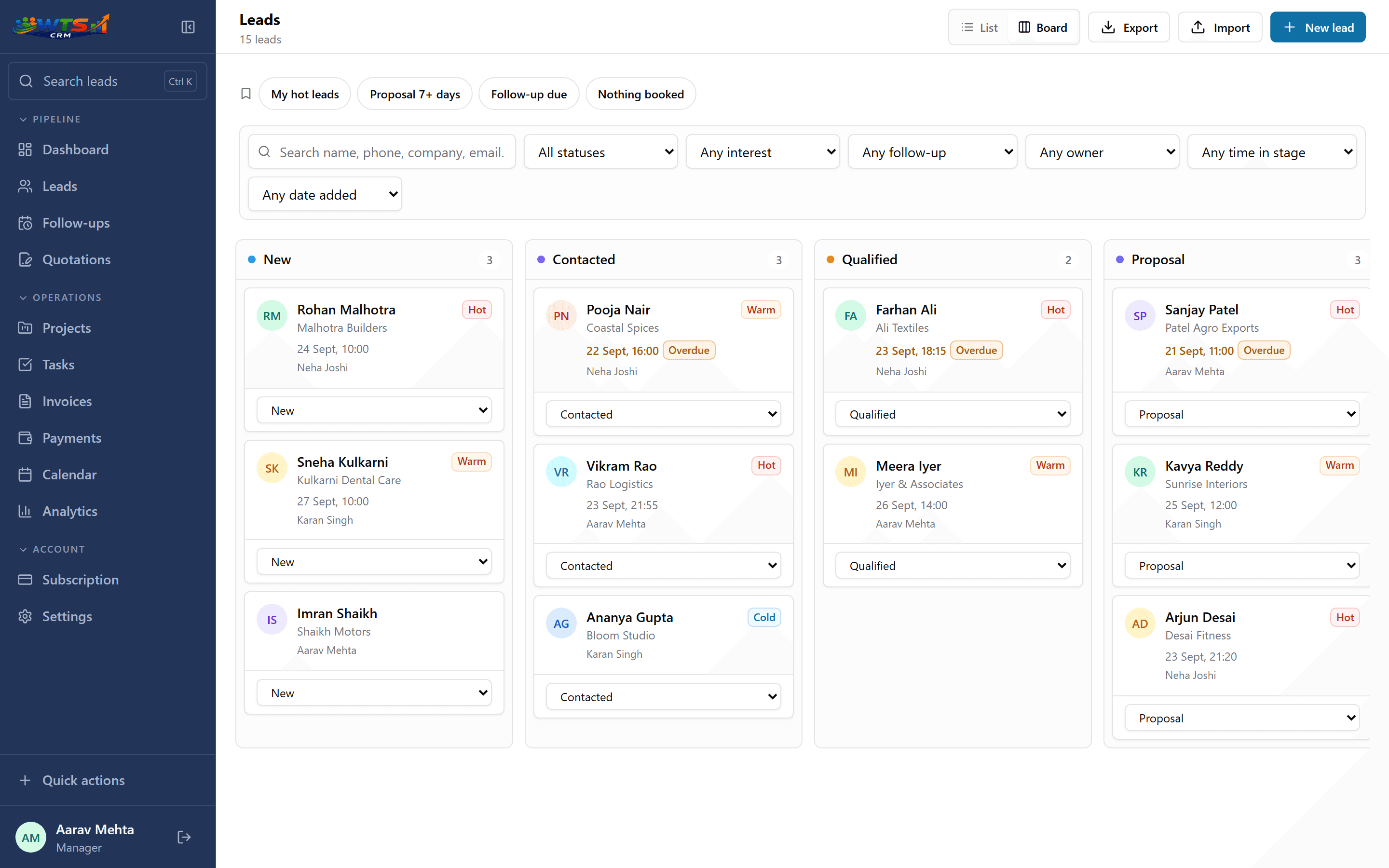
From click to qualified lead
Speed matters most in the first hour, so the routine is about removing every manual step before the first call.
Connect the form
Create a Google Ads lead source and paste its webhook URL into each lead form. Send test data to confirm it arrives.
Assign the first owner
Decide who calls paid leads, so a new one never waits for someone to claim it.
Call within the hour
The lead arrives with its phone number. Call, then send a WhatsApp from a saved template if they do not pick up.
Qualify and tag
Set the stage and temperature, and note what they need and their budget.
Review by source
Each week, check Source quality in Analytics to see how many Google Ads leads were won against other sources, and why the lost ones were lost.
Which Google Ads lead path are you using?
Google Ads enquiries reach you in three main ways, and each connects differently.
- Lead form assets: connect directly with the webhook URL, as above.
- Your own landing page: connect the page’s form to a lead source, keeping UTM tags in the submission.
- Calls from ads: these arrive as phone calls, so add the caller as a lead by hand while you are on the call.
Measure beyond cost per lead
A campaign that brings cheap leads nobody can reach costs more than one that brings fewer, better ones. Because the source stays on each lead, Source quality in Analytics shows how many Google Ads leads were won compared with your other channels. The lead CSV export adds campaign, ad group and ad columns, so you can compare campaigns in a spreadsheet.
WTS CRM does not send outcomes back to Google Ads or bid for you, and it does not import cost data. Keep campaign spend in Google Ads and compare it with the leads and wins you see in the CRM. For response times, read how quickly you should respond to a new lead.
Who runs Google Ads into the CRM
Digital marketing agencies
Show clients what happened to their leads, not just the cost per lead. See CRM for digital marketing agencies.
Solar, interior and home services
High-intent local searches that need a site visit booked fast. See CRM for solar installers.
Coaching and education
Admission enquiries that peak with the season. See CRM for coaching institutes.
Real estate
Project campaigns that bring in hundreds of enquiries a week. See CRM for real estate agents.
What changes when ad leads land in a CRM
- Lead form submissions arrive in seconds through a webhook, with no CSV downloads.
- The campaign, ad group and ad IDs stay on each lead.
- Every paid enquiry has an owner and a dated follow-up from the first minute.
- Analytics shows how many Google Ads leads close compared with your other sources, not only how many forms were filled.
What it costs
Lead sources and webhooks are in every plan. Starter (₹499 a month) suits one person and up to 100 clients and leads, which a busy campaign can pass in weeks; Solo (₹999) removes the limit, and Team (₹2,499) adds 5 seats so paid leads can be shared out.
Starter
₹499 / month
- One user workspace
- Up to 100 clients and leads
- Lead stages, temperature and notes
- Follow-up dates and reminders
- Basic CRM dashboard
The trial unlocks every feature for 7 days and asks for no card. Choose a plan only when it ends.
Frequently asked questions
Does WTS CRM connect to Google Ads lead forms?
Yes. Add a Google Ads lead source in Settings and paste its webhook URL into the lead form’s webhook delivery in Google Ads. Each submission arrives as a lead within seconds, and you can send test data to check it.
Is the campaign saved on the lead?
Yes. Google sends the campaign, ad group and creative IDs with each lead form submission. They are shown on the lead and included in the lead CSV export, with Google Ads as its source.
What do I put in the Key field in Google Ads?
Any text, for example your business name. The webhook URL already identifies your lead source.
Can leads from my landing page come in too?
Yes. Connect your website form to a lead source; UTM tags in the submission, such as utm_campaign, are saved on the lead.
Does it send conversions back to Google Ads?
No. WTS CRM does not upload offline conversions to Google Ads. Use it to see what happened to each lead, and keep bidding and conversion tracking in Google Ads.
What happens if the same person submits twice?
Phone numbers are normalised, and the same number cannot be two leads in one workspace, so a repeat submission does not create a duplicate.